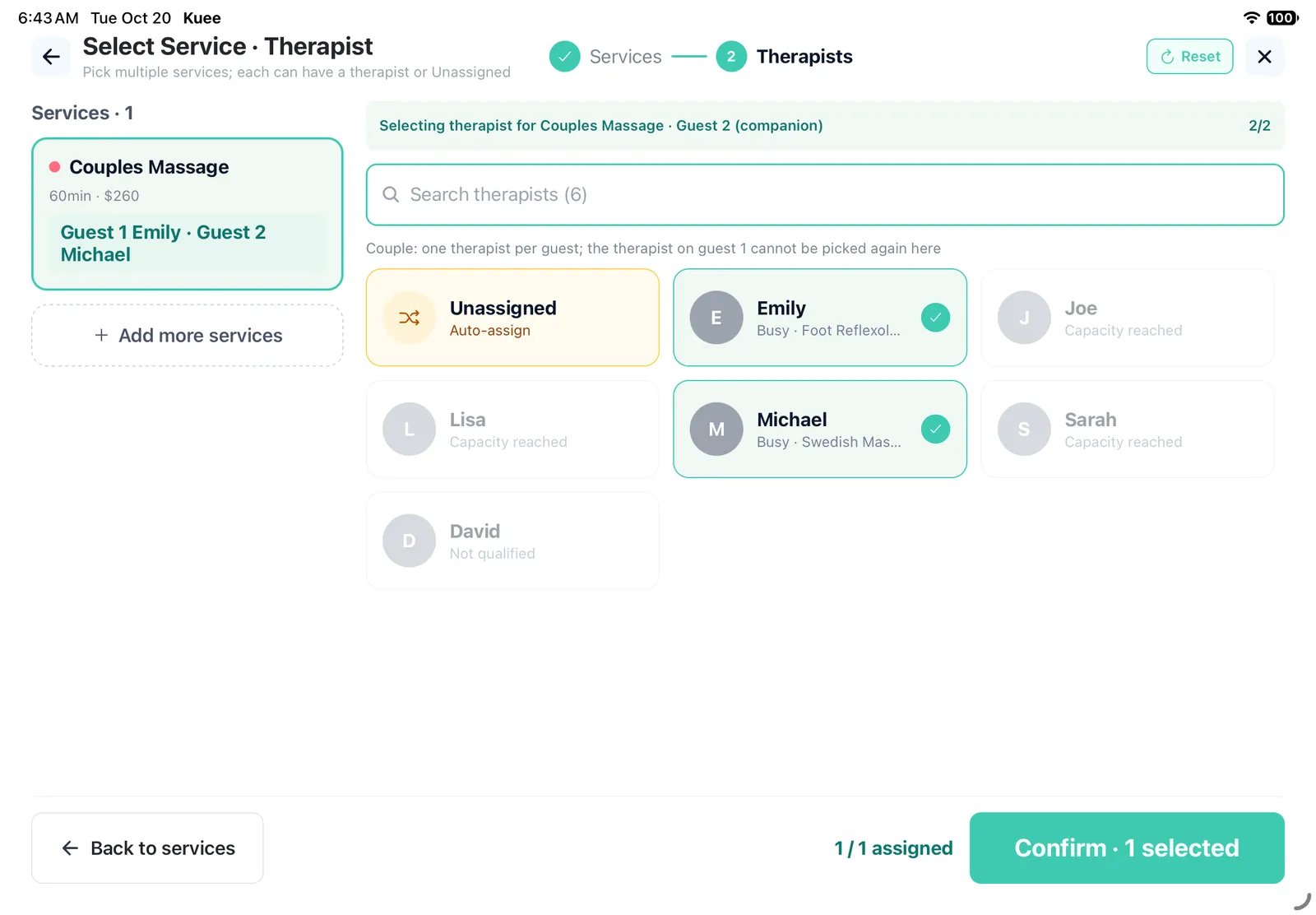
A couple books a 60-minute couples massage. Until now the booking had room for one therapist: the first therapist who took it on the claim board took the whole job, and starting the timer for one started it for both. In Kuee 4.43, couples and four-hand services always have two therapist spots. Each spot can be a therapist or Unassigned, each therapist takes their own spot, and checkout waits until both are filled.
This release also splits the comms package into a $10 base plus a text pack and an AI call pack you choose separately, gives appointment reminders their own text and timing, and lets you write your own Google review request.
Two therapists for couples and four-hand services
Two kinds of services need two therapists. A Couple service is two guests, each with their own therapist. A Four-hand service is one guest with two therapists working together. Kuee now books both kinds with two spots.
How to set it up
- Go to System Settings → Services & Resources → Service Items and open the service.
- In the Duration Variants table, switch on Couple for durations booked by two guests, or Four-hand for durations with two therapists on one guest. Both are off by default.
- Save. When Couple is on, Four-hand is greyed out: a service is one or the other.
Owners and admins can change service settings. Existing bookings are not changed; only new bookings get two spots.
Booking at the front desk
In Add Appointments, pick the service and then the therapists. The picker shows two spots, #1 and #2 for four-hand, or Guest 1 and Guest 2 (companion) for a couple. Pick a therapist for each, or pick Unassigned if you do not know yet. Done is ready once both spots are set. A therapist already on one spot is greyed out for the other.
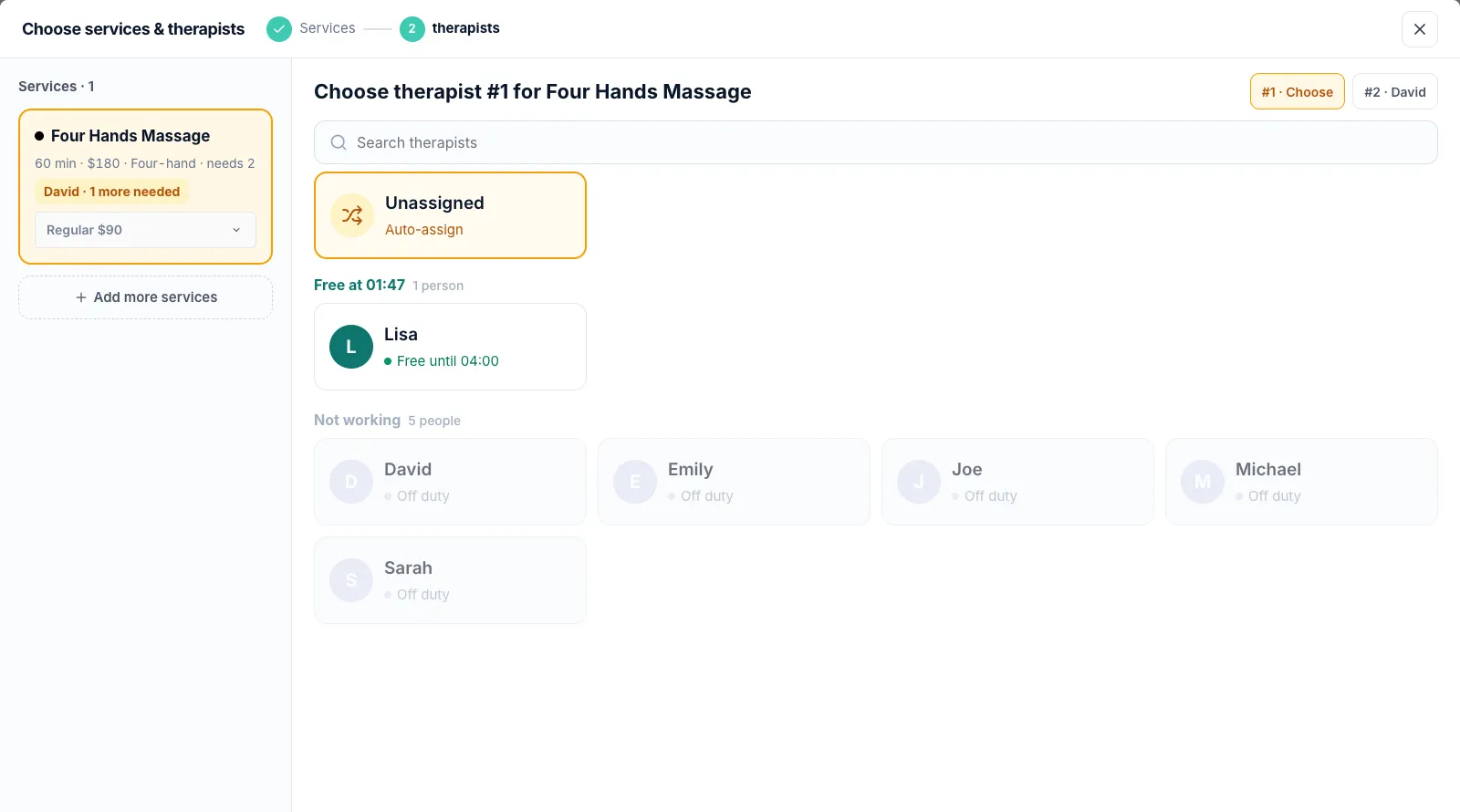
A couples booking shows one line per guest, each at half the price. When times are offered with No preference, Kuee shows only times when two therapists are free together.
Day to day
- Check-in works with an empty spot. Kuee says how many spots still have no therapist, for example "1 seat still has no therapist", and shows how many are assigned.
- The claim board shows an open four-hand job as "Four-hand · 1 more needed", and a couples booking as one card per guest. A therapist can take only one spot in a booking. Starting a service starts the timer only for the therapist who tapped, and undoing a claim undoes only their own.
- Checkout asks you to assign every spot before taking payment.
Online booking and self check-in
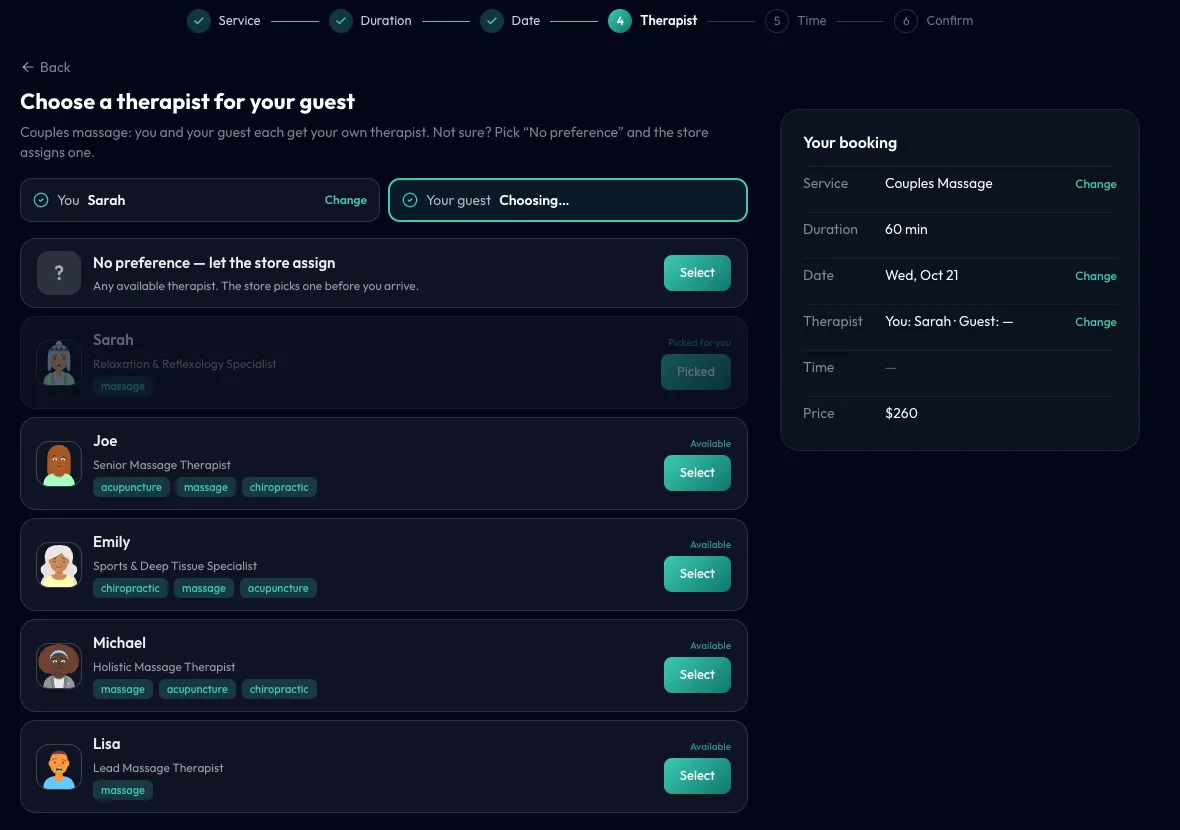
On your online booking page, a couples service asks the client to Choose a therapist for you and then Choose a therapist for your guest. A four-hand service asks for a first and a second therapist. Either can be No preference, and the client can go back and change it. On the self check-in screen, couples and four-hand services are booked on their own and the client chooses two therapists the same way. If the two have no open time in common, the screen says so.
Good to know
- Bookings from the AI phone and the website chat get two spots for four-hand services. A couple booked by phone or chat is still one booking per guest.
- The pictures in this section show the English app.
Text packs and AI call packs, bought separately
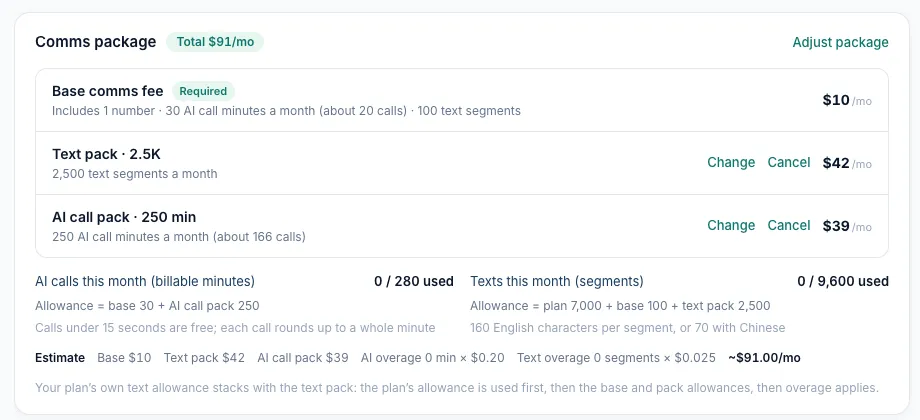
The comms package for your store number is now a required Base comms fee plus two optional packs, so you only pay for what you use. A store that texts a lot but gets few calls adds a text pack and nothing else.
| Part | Price | What you get each month |
|---|---|---|
| Base comms fee (required) | $10/mo | 1 number, 30 AI call minutes (about 20 calls), 100 text segments |
| Text pack | $19 / $42 / $89 a month | 1,000 / 2,500 / 5,000 text segments |
| AI call pack | $18 / $39 / $75 a month | 100 / 250 / 500 AI call minutes (about 66 / 166 / 333 calls) |
Beyond your allowance, AI calls are $0.20 per billable minute (calls under 15 seconds are free, and each call rounds up to a whole minute), and texts are $0.025 per segment. Extra numbers are $10 a month each and add no allowance. Phone and SMS usage may be billed separately.
Your plan's own text allowance now stacks with the base and the text pack: the plan's allowance is used first, then the base and pack allowances, then overage applies. Before, only the larger of the two counted.
How to add or change a pack
- Go to System Settings → Communications → AI Phone. The Comms package card shows each part, this month's usage and an Estimate of your monthly cost.
- Tap Adjust package, choose a Text pack and an AI call pack (or None), and tap Confirm changes.
- Adding or upgrading a pack starts now, and the difference for the rest of this billing period is added by day to your next invoice. Downgrades and cancellations start next billing period, and you can Restore a canceled pack before then.
When you get your first number, step 1 of the number dialog asks the same question. Only owners and admins can change the comms package.
Good to know
- Nothing changes on your bill unless you add a pack. Stores with an AI number keep the $10 base and its allowance.
- If you go over in a month on a product with no pack, the card shows about how much the overage costs and which pack would cover it.
- The picture shows the English app.
Booking confirmations and reminders are now separate
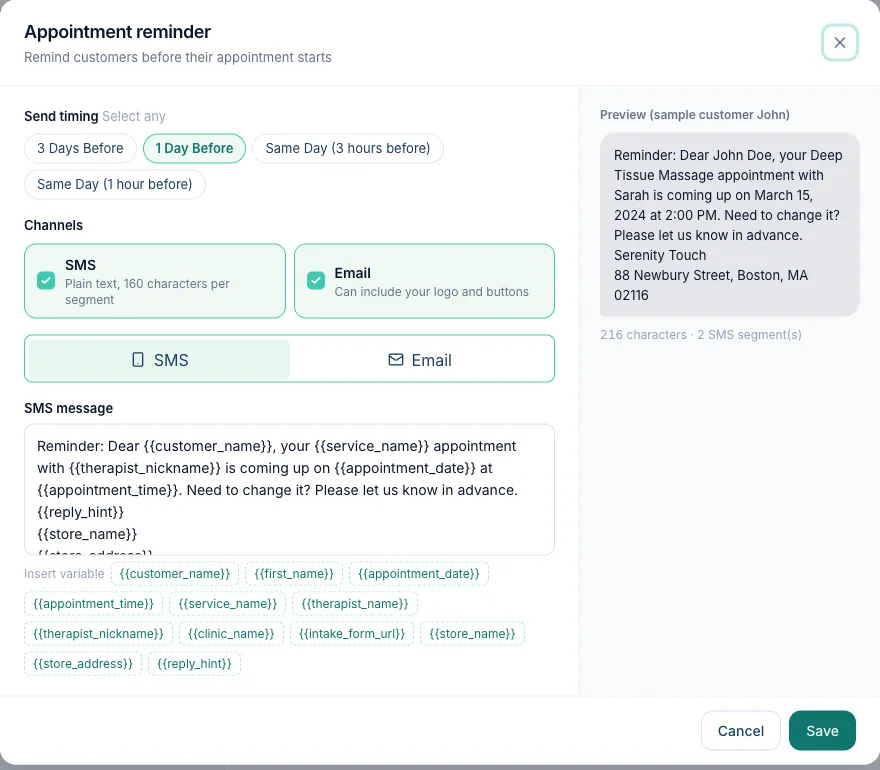
Clients used to get the same text when they booked and again the day before, which read like a second confirmation. Now there are two notifications, each with its own text and timing:
- Booking confirmation goes out when the appointment is booked: Send Immediately or 10 Minutes Later.
- Appointment reminder goes out before the appointment: 3 Days Before, 1 Day Before, Same Day (3 hours before) or Same Day (1 hour before). The default text starts with "Reminder:".
How to set it up
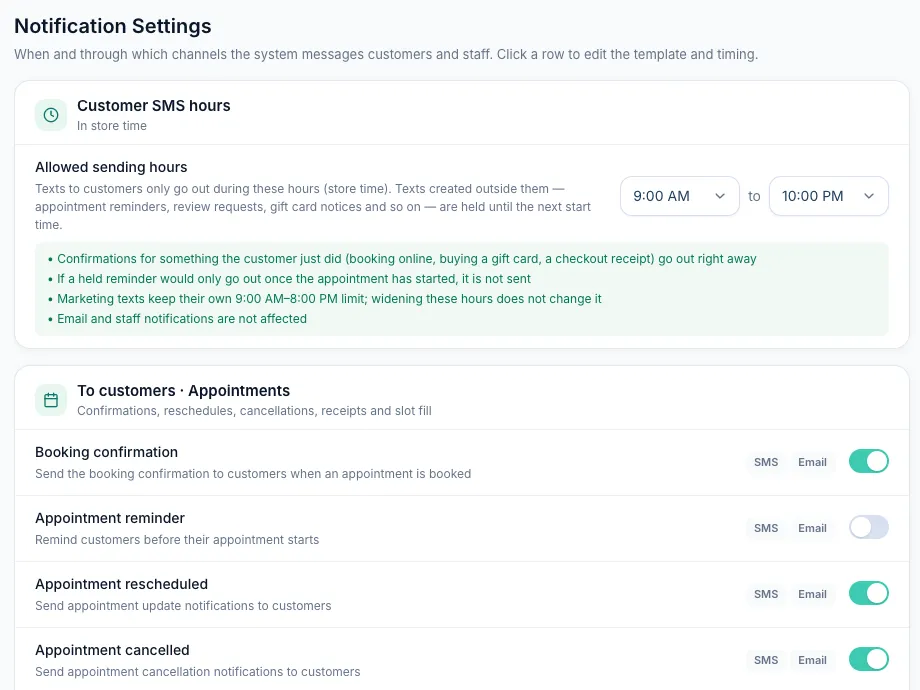
- Go to System Settings → Communications → Notification Settings and find Appointment reminder under To customers · Appointments.
- Tap the row, pick one or more send times, choose SMS and Email, and edit the message if you like.
- Turn it on and tap Save. Owners and admins can change it.
If your store already sent reminders, Kuee moved them into Appointment reminder for you. The send times stay the same, and if you had written your own text, it was copied over. If you did not send reminders before, the row is off: turn it on to start.
Fewer repeated texts
- Rescheduling no longer sends an extra confirmation. The client gets the update, and waiting reminders move to the new time.
- When the front desk edits the same appointment several times on the web app, the client gets one update with the final time, about two minutes after the last edit. An edit for an appointment within the next two hours goes out right away, and a booking canceled within those two minutes sends no update.
More new features
Write your own Google review request
In System Settings → Communications → Notification Settings, open Google Review. The text box is back: write your own message with the client's first name, your store name and the Review link, and check it in the preview. The message must include the review link. Reset to default brings back Kuee's text. Your text goes out only after you change it and save; until then, clients get the same text as today. The "Book again" link is still added when it fits in the same segment. Every client gets the same text, whatever their language.
Every client can choose Google
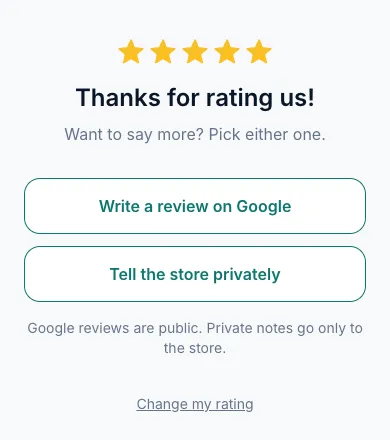
On the page a client opens from a review request, every star rating now leads to the same choice: Write a review on Google or Tell the store privately, side by side. Before, only four and five stars saw the Google link. Google's rules do not allow asking only happy clients for reviews, and a store that does can lose its reviews. Private notes still go only to your store.
Opt-outs written in plain words
Clients do not always reply STOP. When a client texts your store number something like "please stop texting me", Kuee now recognizes it in Messages:
- When Kuee is very sure, it records an opt-out for your store and cancels texts already waiting to go out. The conversation shows Opt-out recorded by AI with Undo.
- When it is less sure, the conversation shows Customer may want to opt out with Confirm opt-out and Dismiss.
Email and your other stores are not affected. Undo turns texting back on and queues the canceled reminders again. STOP, START and HELP work as before, and a client's own STOP cannot be undone.
On the iPad front desk in the next app update
- Two therapist spots: booking, the therapist picker, calendar cards ("Couple · 1/2 assigned", "Four hands · 1 more needed"), appointment details, check-in, checkout and service settings work as on the web.
- Couples can pay separately: at checkout, pick Split between two to take two payments for one couples booking, as on the web since 4.42.
- Checkout in the sidebar always lists today's tickets, even when the calendar shows another day.
- Gift card templates: the keyboard no longer covers the field you are typing in.
- Store info: the online booking link in the app now uses your store's own web address, the same one the web app shows.
- Notification settings show Booking Confirmation and Appointment Reminder as separate rows.
- Sign-in: after the iPad has been asleep for a long time, lists such as the service picker load again instead of showing an error, and a rare start-up where the PIN screen showed no team members is fixed.
Fixes you may notice
- Checkout without a therapist: a card is no longer charged when a service has no therapist. Kuee asks you to assign one first, and says the card was not charged.
- Marketing texts end with the opt-out line in each client's language, or English when the client has no language set. Before, every client got it in Chinese.
Questions about this update
Tell us what works for your store and what does not: contact us and we will walk you through any of these changes on your own store.