A regular books a deep tissue on Saturday. Before you pick a therapist, it helps to know two things: does this client usually tip well, and is it a man or a woman on the table. In Kuee 4.45 the web app shows both without opening another page. Customer Details has a new Tipping habits card and a Tip column in Billing Records. Calendar cards, the appointment details and the claim board show a small M or F tag next to the client's name.
The claim board and the web calendar also catch up by themselves when a live update is missed, and the claim board reloads by itself when we ship a new version.
See each client's tipping habits
A therapist asks whether the guest at 3:00 tips. Until now you had to scroll through the orders and work it out. Now the answer sits at the top of the client's page.
Where to find it
- Open Customer in the menu and click a client. Customer Details opens.
- The Tipping habits card is at the top of the right column.
- Scroll down to Billing Records. The old amount column is now two columns: Spend and Tip.
There is nothing to turn on. Owners, admins and front desk logins see the card. Therapist logins do not.
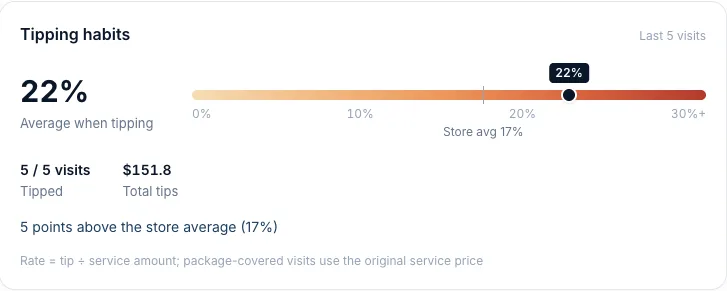
How to read the card
- Average when tipping is the big number: tip ÷ service amount, averaged over the visits where the client left a tip, weighted by amount. The card uses the last 12 visits (fewer if the client is newer).
- The color bar runs from 0% to 30%+, light to deep red. The dot is this client. Store avg marks your store's average over the last 90 days.
- Tipped shows how many of those visits had a tip, for example 5 / 5 visits. Total tips adds them up.
- The line under it compares the client with your store, for example 5 points above the store average (17%).
A visit paid with a package counts at the original service price. A visit closed by auto-checkout with no tip is left out, because it means "no tip recorded", not "no tip". If a tip is added later, the visit counts again.
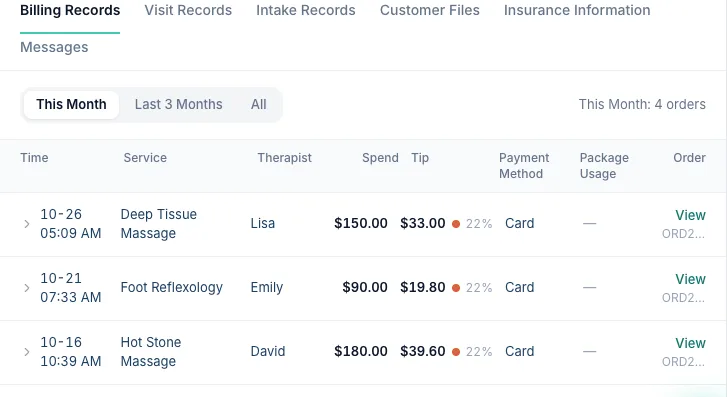
In Billing Records, each Tip cell shows the amount, a dot in the same color scale and the percentage. Package purchases, other charges and refunds show N/A, because they do not count toward tips. The client's profile card on the left also gets a short Tip line.
Getting the most out of it
- Use it when you assign a new therapist to a regular: a high tipper is a good first client for someone building a book.
- A low number is not a judgment. Some clients tip in cash and the desk never enters it.
- Enter tips at checkout, cash ones too. The card is only as good as what is recorded.
Good to know
- If most visits at your store have no tip recorded, the card adds a line: Most tips at this store are not recorded in the system, so these numbers may be low.
- The walk-in record holds many different guests, so it shows Walk-in records combine many guests, so tipping habits are not tracked instead of a card.
M and F tags on the calendar and claim board
The front desk often needs to know who is coming before assigning a therapist: some clients ask for a woman therapist, some therapists only take certain clients. Kuee already had the client's gender, from the online booking page or the client's profile, but you had to open the profile to see it.
Now it shows where you assign work:
- Appointment calendar cards, in By time and By staff: a small blue M or pink F before the client's name.
- The client card in the appointment details: the tag after the name.
- The claim board, under My jobs and Up for grabs: the tag after the client's name.
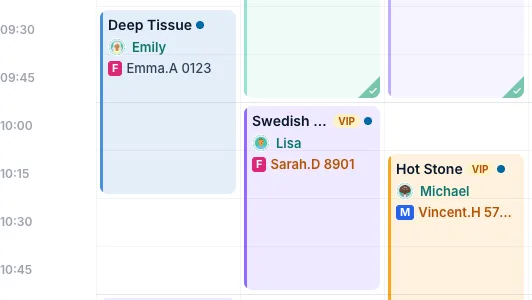
There is no setting. The tag shows only when the client's profile says Male or Female. If the gender is empty or the client chose not to say, the card looks exactly as before. To add or fix it, edit Gender on the client's profile.
The tag is also left off when the name on the card is not the client's own profile: walk-in records, a guest booked with someone else, and the second guest of a couples booking.
Smaller improvements
- The claim board and calendar catch up by themselves. A tablet that goes to sleep, or a browser tab in the background, can miss a live update. Before, the claim board could keep showing a therapist as in progress for many minutes after checkout, and the web calendar needed a manual refresh. Now both reload the moment you come back to them, the claim board checks every 30 seconds, and the calendar refreshes after a minute with no updates or after the connection comes back.
- The claim board updates itself. When we ship a new version, the claim board shows the same short countdown as the self check-in screen and reloads. It waits while a therapist is signed in or typing a PIN.
- Help Center: Card readers & iPad. The Help Center has a new group with seven animated tutorials: taking card payments and refunds on Fiserv, and six iPad front desk tutorials (opening and check-in, appointments, checkout, customers, staff schedule and store settings).
Refresh the claim board and any open calendar tabs once after this update. A page that was already open still runs the old version; after one refresh, both keep themselves up to date.
On the iPad and phone app in the next app update
- Tipping habits on the iPad: an Avg tip chip on the client page, and Spend and Tip columns with a tip total in the Transactions tab.
- Tipping habits on the owner phone app: the client page shows the tip card, upcoming appointments (soonest first) and the last 10 purchases.
- M / F tags on the iPad calendar (by time and by staff), in the appointment details on the iPad, and in the owner phone app's appointment details.
- Interface mode: on the role page, a tablet that was detected as a phone can be switched to Tablet by hand, so the Front Desk Terminal shows. The choice stays on that device only.
- Client page on the iPad: canceling or rescheduling an upcoming appointment from the client page now works, and reschedule opens the calendar on that day.
- Help & tutorials on the iPad: a new entry in the sidebar and on the owner's and therapist's Me page, with search and the tutorials.
- Fiserv stores on the iPad: the sidebar no longer shows a card reader status that only applies to Stripe, and the payment settings text no longer mentions Stripe.
Fixes you may notice
- Card surcharge note on Fiserv: Payment Settings → Tips & more said the surcharge was applied to service plus tip. It now says what has always happened: the surcharge is on the service amount only, not on tips. Nobody was charged extra.
- Extra services at checkout: the Extra services, Add-on and Added labels showed in English in the Chinese, Korean and Vietnamese apps. They now follow your language.
Questions about this update
Tell us what works for your store and what does not: contact us and we will walk you through any of these changes on your own store.